

April Birthdays
April 21st - Brayden - 2A
April 22nd - Jack - 2C
Announcements

Schoology Weekly Checksheet
 Based on feedback received from second grade parents, we have created a Schoology Assignment Weekly Checklist to help support your child's learning at home. Each week there will be an updated tab at the bottom with each of the tasks/assignments that need to be completed throughout the week. If you would like to make a digital copy of the checklist, you may do so by clicking here.
As a reminder, all assignments for the entire week will be posted in Schoology at 8 a.m. on Monday mornings to allow for you to spread out throughout the week/weekend as your family sees the best fit. Each week the objectives for the upcoming week are published to the blog. We realize that each family has its own unique circumstances during this time and we want to support you as best we can. There is a schedule linked in Schoology each week as an option but this is just one option in how to spread out the workload throughout the week/weekend.
Administrative Professionals Days
Each year second grade is in charge of celebrating our very own AMAZING Mrs. Fairchild for Administrative Professionals Day! She cherishes the books we've made her each year and reads each and every note from the kids. Since we're unable to make her a tangible book from the kids we are asking our second graders to leave her a note on the Padlet below. They can upload a picture they've drawn, write a quick thank you note, or record a video message. Please complete by Tuesday, April 21st so we can share with Mrs. Fairchild on Friday!
Text Read Aloud
As a reminder, all assignments for the entire week will be posted in Schoology at 8 a.m. on Monday mornings to allow for you to spread out throughout the week/weekend as your family sees the best fit. Each week the objectives for the upcoming week are published to the blog. We realize that each family has its own unique circumstances during this time and we want to support you as best we can. There is a schedule linked in Schoology each week as an option but this is just one option in how to spread out the workload throughout the week/weekend.
Administrative Professionals Days
Each year second grade is in charge of celebrating our very own AMAZING Mrs. Fairchild for Administrative Professionals Day! She cherishes the books we've made her each year and reads each and every note from the kids. Since we're unable to make her a tangible book from the kids we are asking our second graders to leave her a note on the Padlet below. They can upload a picture they've drawn, write a quick thank you note, or record a video message. Please complete by Tuesday, April 21st so we can share with Mrs. Fairchild on Friday!

Text Read Aloud
We know that some content and directions in Schoology may be above the independent reading level of a second grader in April. See directions below (or video above) for turning on Text Read Aloud and Using Text Read Aloud for your child's iPad.
Turning on TEXT READ ALOUD:
- Settings - Accessibility - Spoken Content
- Turn on "Speak Selection" (make sure it is green)
- Select "Highlight Content" - turn on "Highlight Content" (make sure it is green)
- Go back to "Spoken Content"
- Select "voices"
- Select "English"
- Select "Alex" (make sure the checkmark is by "Alex" - this might take a minute to download. This voice we have found is the least robotic-sounding)
- Go back to Voices - Spoken Content
- Change Speaking Rate to the desired speed
Using TEXT READ ALOUD:
- Highlight the text you want to be read aloud
- How to Highlight: (skip this part if you know to highlight text)
- With a finger, press and hold over the text you want to be read aloud
- Click and drag the little blue dots so all the text is highlighted
- A toolbar should pop up above the text
- Select "Speak
- Turn on "Speak Selection" (make sure it is green)
- Select "Highlight Content" - turn on "Highlight Content" (make sure it is green)
- Select "voices"
- Select "English"
- Select "Alex" (make sure the checkmark is by "Alex" - this might take a minute to download. This voice we have found is the least robotic-sounding)
- Change Speaking Rate to the desired speed
- Highlight the text you want to be read aloud
- How to Highlight: (skip this part if you know to highlight text)
- With a finger, press and hold over the text you want to be read aloud
- Click and drag the little blue dots so all the text is highlighted
- A toolbar should pop up above the text
- Select "Speak
Sick Days
Just like when we are meeting in the school building, please let us know if your child is under the weather or sick. We know that at times this may affect their ability to work through the day's assignments. We want to work with you to ensure that this process is best for your child, especially if they are ill.
Schoology

Free CISD Meal Distribution
 As a reminder that CISD is providing free lunches that are available to all families. CISD serves meals Monday-Thursday from 11 a.m. to 12 noon at Austin, Town Center, Valley Ranch and Wilson. There are two meals given on Thursday and no site distribution on Fridays. Children no longer need to present to get a meal. Parents and guardians can collect meals for their children. See https://www.coppellisd.com/Page/16658 for next week's menu.
Just like when we are meeting in the school building, please let us know if your child is under the weather or sick. We know that at times this may affect their ability to work through the day's assignments. We want to work with you to ensure that this process is best for your child, especially if they are ill.
Schoology

iStation

Just a reminder that learners are required to spend 45 minutes on iStation each week. They can break it up and log on for 15 minutes three times a week or all at once however works best for your schedule. If you have any questions regarding iStation, feel free to reach out to Mrs. Judd or Ms. McGraw.
DreamBox

As a reminder, learners are required to complete at least 5 lessons on DreamBox each week. These can be completed all at once or spread out throughout the week as your family sees the best fit. We ask that learners complete any assigned lesson (marked with a blue calendar) before picking which lesson they would like to complete. To view their lessons completed each week, learners can click on the image of their avatar in the top-left corner of the screen.
iStation
Just a reminder that learners are required to spend 45 minutes on iStation each week. They can break it up and log on for 15 minutes three times a week or all at once however works best for your schedule. If you have any questions regarding iStation, feel free to reach out to Mrs. Judd or Ms. McGraw.

Just a reminder that learners are required to spend 45 minutes on iStation each week. They can break it up and log on for 15 minutes three times a week or all at once however works best for your schedule. If you have any questions regarding iStation, feel free to reach out to Mrs. Judd or Ms. McGraw.

As a reminder, learners are required to complete at least 5 lessons on DreamBox each week. These can be completed all at once or spread out throughout the week as your family sees the best fit. We ask that learners complete any assigned lesson (marked with a blue calendar) before picking which lesson they would like to complete. To view their lessons completed each week, learners can click on the image of their avatar in the top-left corner of the screen.
Reflex Math
 Each learner is required each week to work on Reflex Math three times a week for approximately 15-20 minutes. Our goal is for learners to earn a green light 3 times a week. Although the Green Light depends on students correctly answering facts, not time used, students can typically get the Green Light in 15 minutes of concentrated use. Read here to learn more about how to help your child successfully achieve a green light three times a week.
Imagine Learning
 Imagine Learning is a program used with select EL learners. If your child had Imagine Learning login information on their login sheet, we ask that they are using for approximately 20-30 minutes daily (Monday-Friday). Please make sure that your child is finishing their lesson before logging out. If a learner logs out before their lesson is complete, they will have to start it over upon their next login.
Technology Support
 As we continue to learn and navigate Schoology through distance learning we will continue to create resources as a second-grade team, TCE campus, and district to help navigate Schoology. Continue to check back as we plan on updating regularly as needs and resources arise. If your device is in need of support that you are not able to troubleshoot at home, you can fill out a help desk ticket by following the steps outlined here.
Reflex Math

Each learner is required each week to work on Reflex Math three times a week for approximately 15-20 minutes. Our goal is for learners to earn a green light 3 times a week. Although the Green Light depends on students correctly answering facts, not time used, students can typically get the Green Light in 15 minutes of concentrated use. Read here to learn more about how to help your child successfully achieve a green light three times a week.
Imagine Learning

Imagine Learning is a program used with select EL learners. If your child had Imagine Learning login information on their login sheet, we ask that they are using for approximately 20-30 minutes daily (Monday-Friday). Please make sure that your child is finishing their lesson before logging out. If a learner logs out before their lesson is complete, they will have to start it over upon their next login.
Technology Support

As we continue to learn and navigate Schoology through distance learning we will continue to create resources as a second-grade team, TCE campus, and district to help navigate Schoology. Continue to check back as we plan on updating regularly as needs and resources arise. If your device is in need of support that you are not able to troubleshoot at home, you can fill out a help desk ticket by following the steps outlined here.
What are we learning?
 Math: In math this week, I can use concrete models to count fractional parts beyond one whole using words and recognize how many parts it takes to equal one whole.


Language Arts: In reading this week, I can retell the most important parts of a story and identify the problem.

In writing this week, I can edit and revise my letter for publishing.

Science: In science this week, I can compare the ways living organisms depend on each other and on their environments such as through food chains.

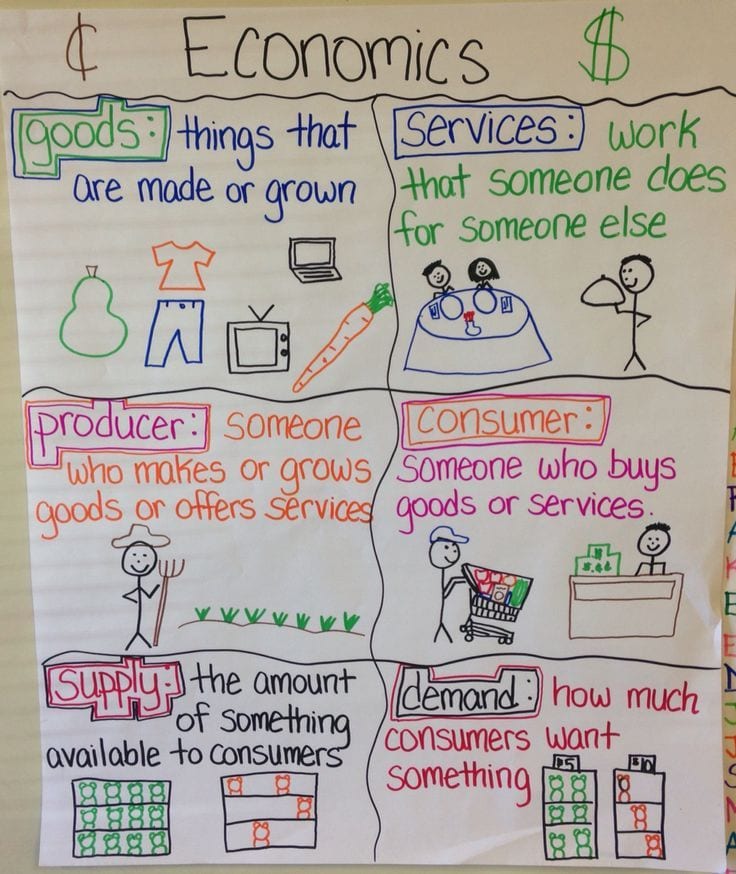
Social Studies: In social studies this week, I can identify ways people are both producers and consumers through listening, speaking, reading, and writing.

Math: In math this week, I can use concrete models to count fractional parts beyond one whole using words and recognize how many parts it takes to equal one whole.


Language Arts: In reading this week, I can retell the most important parts of a story and identify the problem.

In writing this week, I can edit and revise my letter for publishing.

Science: In science this week, I can compare the ways living organisms depend on each other and on their environments such as through food chains.
Social Studies: In social studies this week, I can identify ways people are both producers and consumers through listening, speaking, reading, and writing.


